
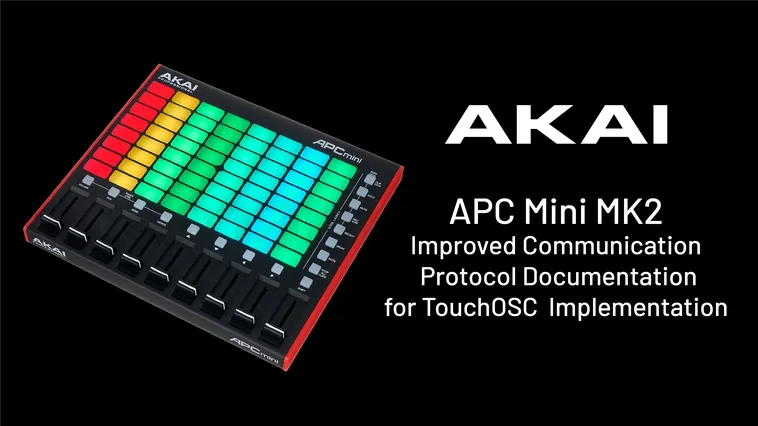
Technical documentation and MIDI/SysEx protocol mapping for the APC Mini Mk2
Compiled and improved for custom software integration.
Quick Reference (TLDR)
For Pads (RGB)
- Channel: LED Behavior
- Note: Pad ID
- Velocity: RGB Color
For Buttons (Single Color)
- Channel: 1
- Note: Button ID
- Velocity: State (On / Blink / Off)
Naming Convention
MIDI channels are described using the 1 to 16 standard.
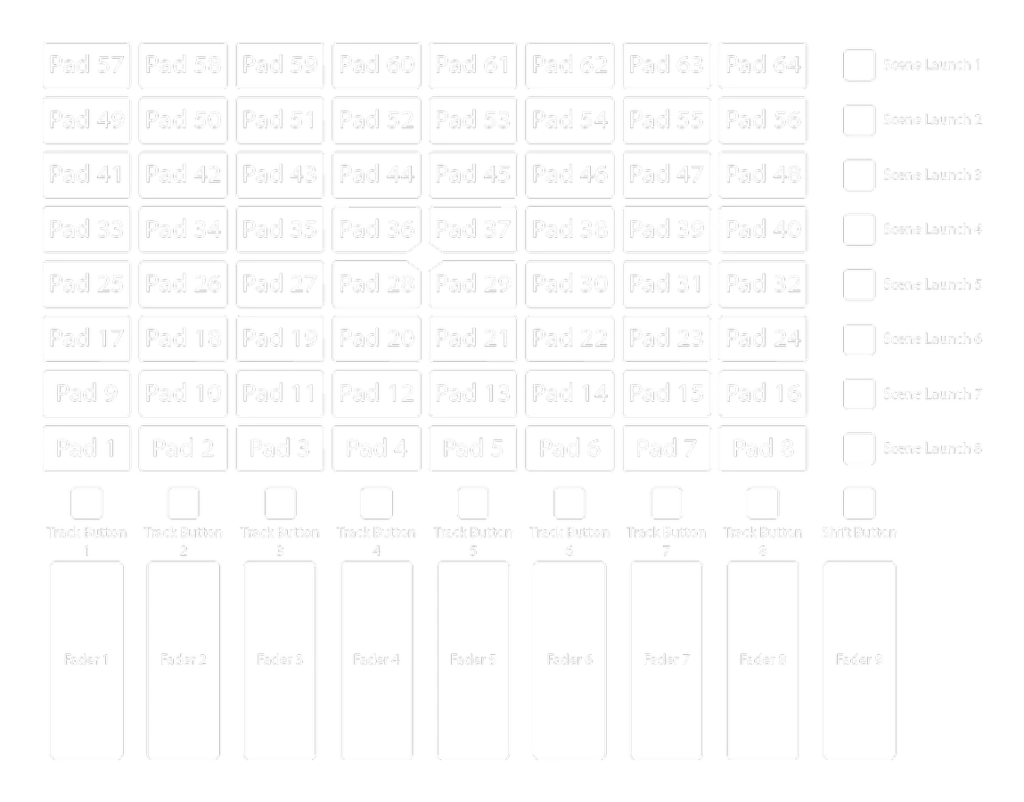
Default MIDI Mapping
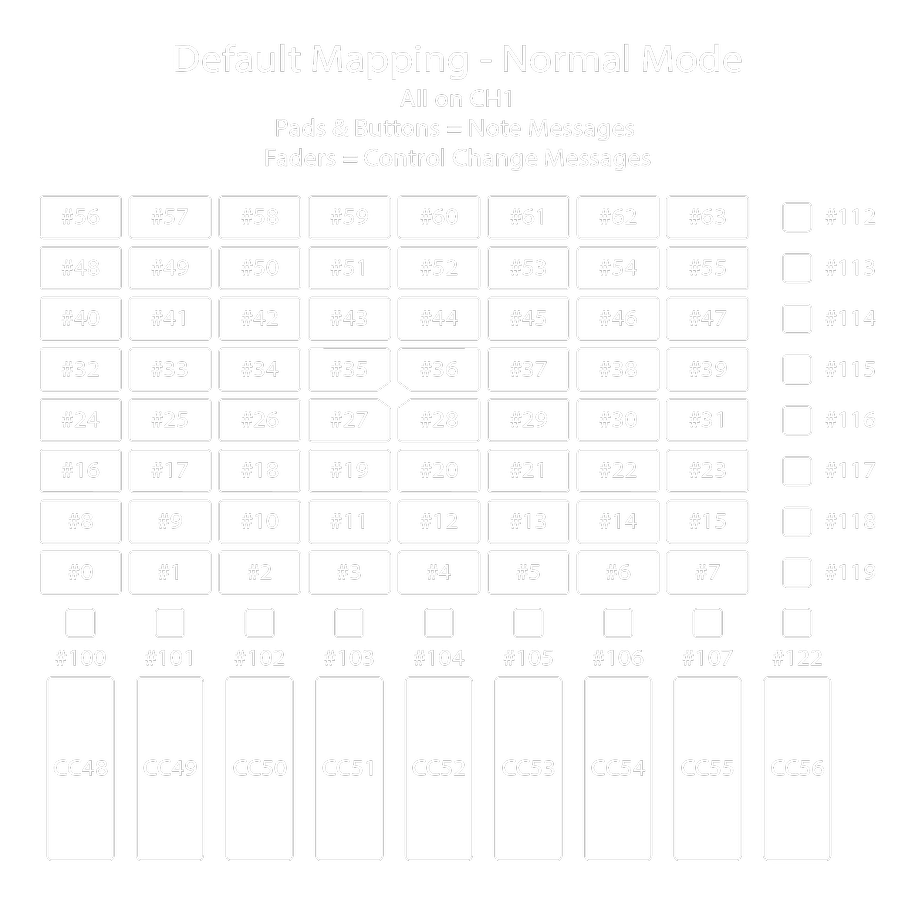
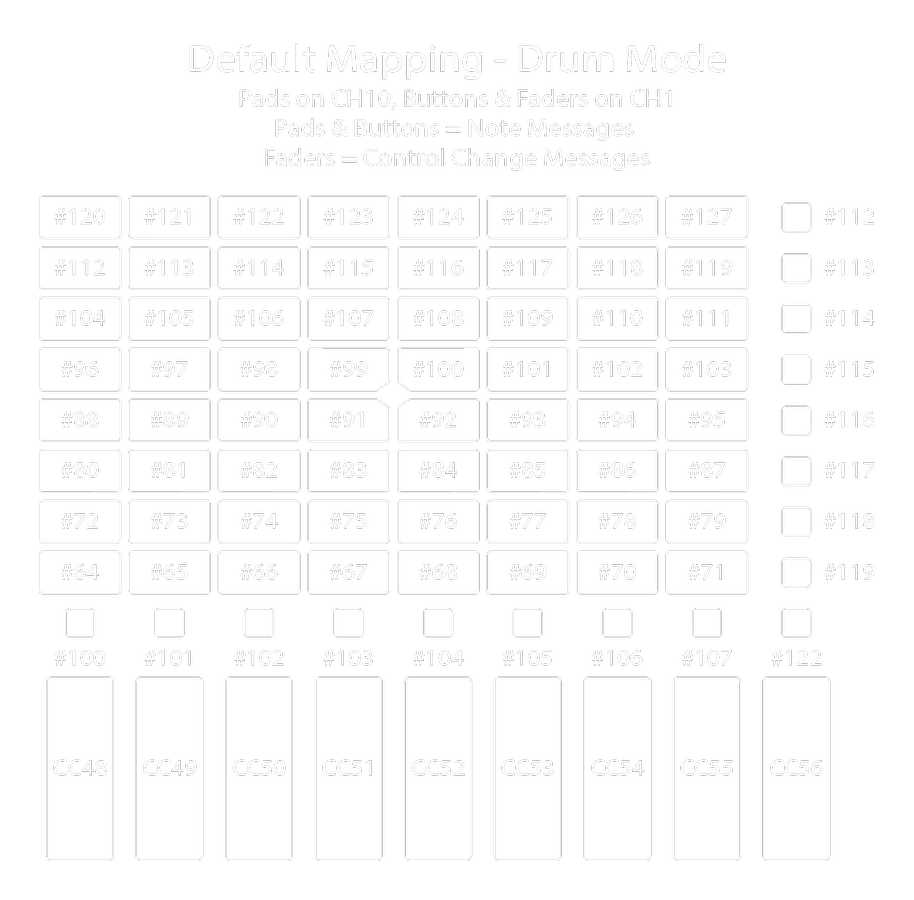
LED Control via MIDI Messages
The pad and button LEDs on the APC mini mk2 can be controlled by Note On messages on Port 1.
These are 3-byte messages determining three factors:
- Pad/Button ID
- Behavior: Solid, Blink, or Pulse.
- LED Color:
- Pads: RGB color, brightness, and animation settings.
- Buttons: Single color LED state and animation settings (no brightness control).
You can control individual LEDs or send bulk commands to update the entire UI surface.
Example Message: To solidly light Pad 1 in red, send the following: 96 00 05
96= MIDI Channel 7 (Determines LED behavior: Solid 100% Brightness)00= Note 0 (Pad ID: First Pad)05= Velocity 5 (RGB Color: Red)
Pad & Button IDs
The second byte in the MIDI message determines which pad or button you are targeting.
MIDI message construction changes depending on whether it is an RGB LED (pads) or a Single LED (buttons).
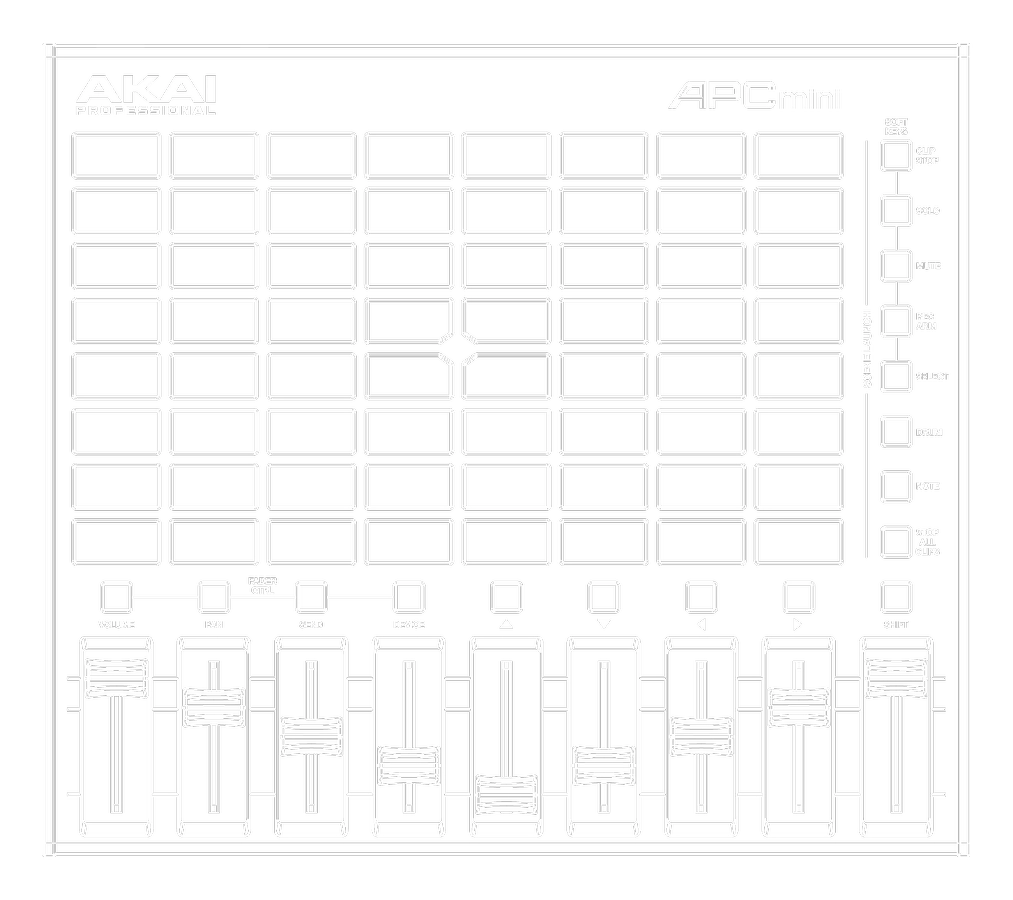
Pads (RGB Matrix)
Each pad is addressed via a Note message.
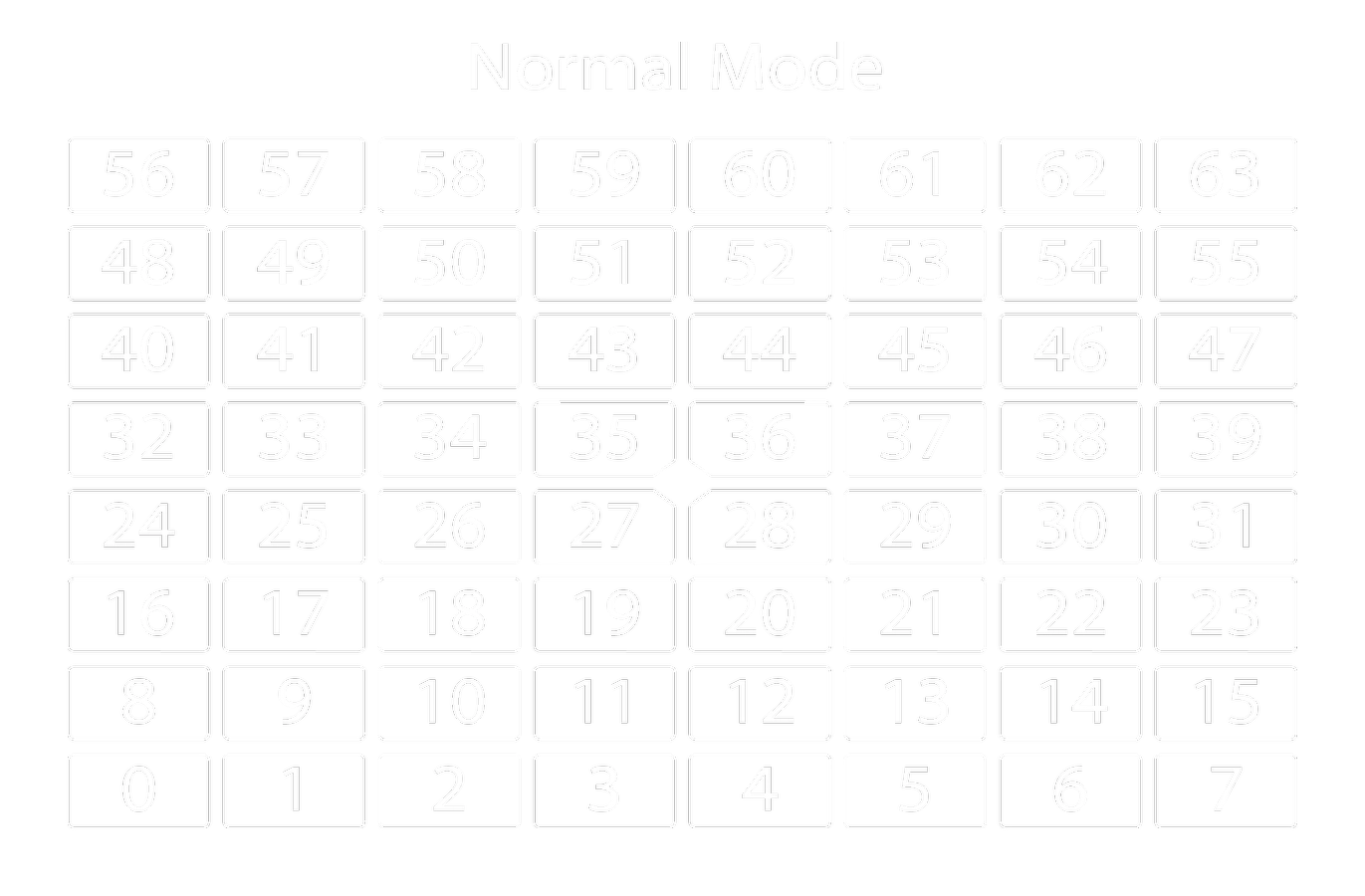
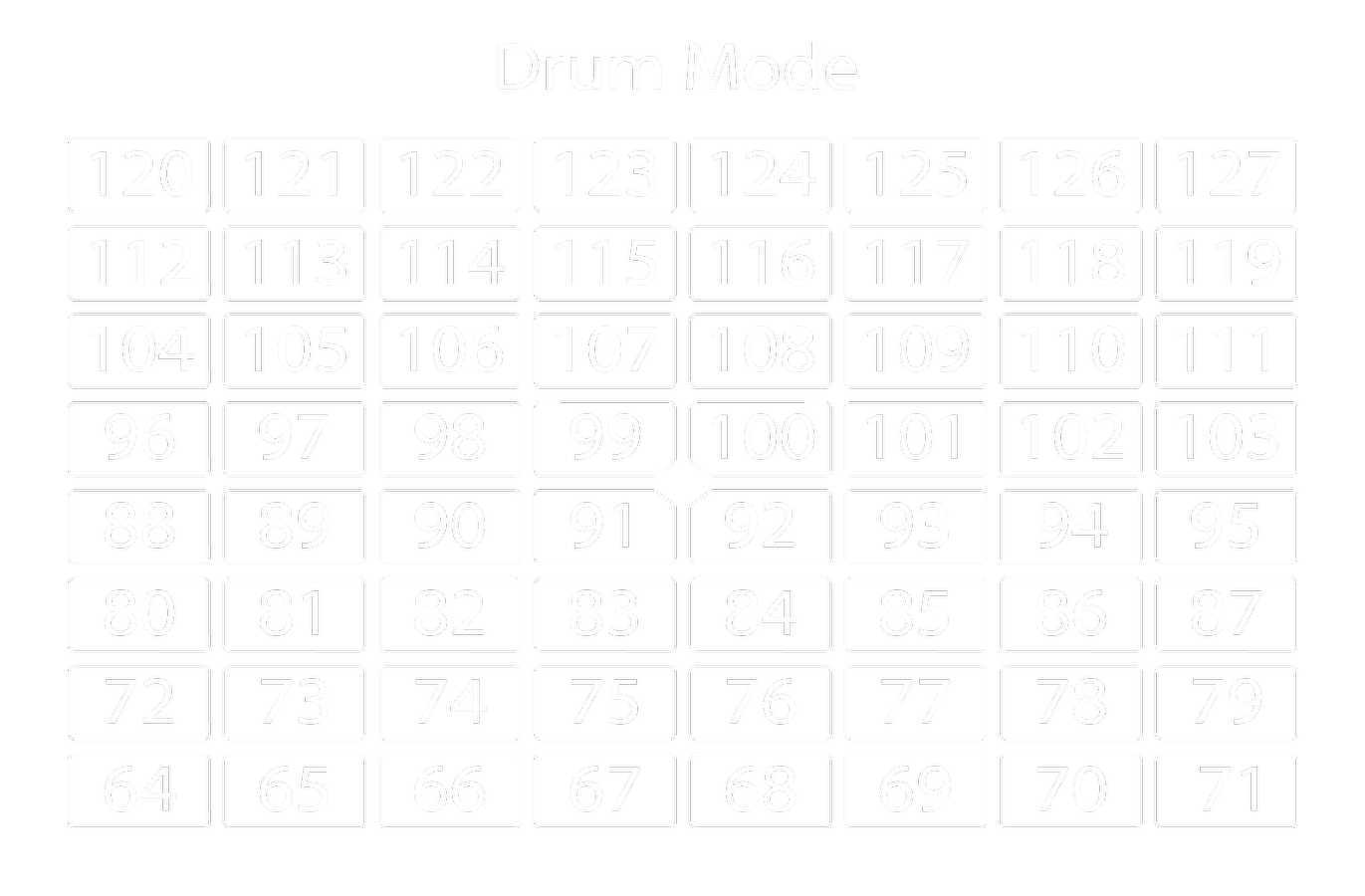
Example : Sending Channel 7 Note On 0 Velocity 5 will : Set Brightness to Full, Target the First Pad, Set Red Color (In Normal Mode)
| Byte 2 Value | Note | Pad Index |
|---|---|---|
| 0x00 | 0 | 1 |
| 0x01 | 1 | 2 |
| 0x02 | 2 | 3 |
| 0x03 | 3 | 4 |
| 0x04 | 4 | 5 |
| 0x05 | 5 | 6 |
| 0x06 | 6 | 7 |
| 0x07 | 7 | 8 |
| 0x08 | 8 | 9 |
| 0x09 | 9 | 10 |
| 0x0A | 10 | 11 |
| 0x0B | 11 | 12 |
| 0x0C | 12 | 13 |
| 0x0D | 13 | 14 |
| 0x0E | 14 | 15 |
| 0x0F | 15 | 16 |
| Byte 2 Value | Note | Pad Index |
|---|---|---|
| 0x10 | 16 | 17 |
| 0x11 | 17 | 18 |
| 0x12 | 18 | 19 |
| 0x13 | 19 | 20 |
| 0x14 | 20 | 21 |
| 0x15 | 21 | 22 |
| 0x16 | 22 | 23 |
| 0x17 | 23 | 24 |
| 0x18 | 24 | 25 |
| 0x19 | 25 | 26 |
| 0x1A | 26 | 27 |
| 0x1B | 27 | 28 |
| 0x1C | 28 | 29 |
| 0x1D | 29 | 30 |
| 0x1E | 30 | 31 |
| 0x1F | 31 | 32 |
| Byte 2 Value | Note | Pad Index |
|---|---|---|
| 0x20 | 32 | 33 |
| 0x21 | 33 | 34 |
| 0x22 | 34 | 35 |
| 0x23 | 35 | 36 |
| 0x24 | 36 | 37 |
| 0x25 | 37 | 38 |
| 0x26 | 38 | 39 |
| 0x27 | 39 | 40 |
| 0x28 | 40 | 41 |
| 0x29 | 41 | 42 |
| 0x2A | 42 | 43 |
| 0x2B | 43 | 44 |
| 0x2C | 44 | 45 |
| 0x2D | 45 | 46 |
| 0x2E | 46 | 47 |
| 0x2F | 47 | 48 |
| Byte 2 Value | Note | Pad Index |
|---|---|---|
| 0x30 | 48 | 49 |
| 0x31 | 49 | 50 |
| 0x32 | 50 | 51 |
| 0x33 | 51 | 52 |
| 0x34 | 52 | 53 |
| 0x35 | 53 | 54 |
| 0x36 | 54 | 55 |
| 0x37 | 55 | 56 |
| 0x38 | 56 | 57 |
| 0x39 | 57 | 58 |
| 0x3A | 58 | 59 |
| 0x3B | 59 | 60 |
| 0x3C | 60 | 61 |
| 0x3D | 61 | 62 |
| 0x3E | 62 | 63 |
| 0x3F | 63 | 64 |
Buttons (Single Color)
Note: The Shift button is not accessible via standard MIDI.
Button messages must always be sent on Channel 1.
Buttons only support single-color LEDs.
The behavior (On/Off) is set via the velocity, not the MIDI Channel.
- Velocity 0 = OFF
- Velocity 1 (and 3 to 127) = ON
- Velocity 2 = ON (Blink)
Example: Sending Channel 1, Note On 100, Velocity 1 will turn the first Track Button LED on.
| Button Name | Byte 2 Value | Note | Channel | LED |
|---|---|---|---|---|
| Track Button 1 | 0x64 | 100 | 1 | Red |
| Track Button 2 | 0x65 | 101 | 1 | Red |
| Track Button 3 | 0x66 | 102 | 1 | Red |
| Track Button 4 | 0x67 | 103 | 1 | Red |
| Track Button 5 | 0x68 | 104 | 1 | Red |
| Track Button 6 | 0x69 | 105 | 1 | Red |
| Track Button 7 | 0x6A | 106 | 1 | Red |
| Track Button 8 | 0x6B | 107 | 1 | Red |
| Button Name | Byte 2 Value | Note | Channel | LED |
|---|---|---|---|---|
| Scene Launch 1 | 0x70 | 112 | 1 | Green |
| Scene Launch 2 | 0x71 | 113 | 1 | Green |
| Scene Launch 3 | 0x72 | 114 | 1 | Green |
| Scene Launch 4 | 0x73 | 115 | 1 | Green |
| Scene Launch 5 | 0x74 | 116 | 1 | Green |
| Scene Launch 6 | 0x75 | 117 | 1 | Green |
| Scene Launch 7 | 0x76 | 118 | 1 | Green |
| Scene Launch 8 | 0x77 | 119 | 1 | Green |
RGB LED Behavior & Color
Behavior (Brightness & Animation)
RGB LEDs can be lit solid at varying brightness levels, or programmed to blink and pulse at different rates.
This behavior is determined by the MIDI Channel (1 to 16) sending the Note On message.
Using our previous example (96 00 05), if we change the first byte to 97 (Channel 8), the LED will pulse red at 1/16 notes, synced with the external clock rate.
| Byte 1 Value | MIDI Channel | Function |
|---|---|---|
| 0x90 | 1 | On 10% brightness |
| 0x91 | 2 | On 25% brightness |
| 0x92 | 3 | On 50% brightness |
| 0x93 | 4 | On 65% brightness |
| 0x94 | 5 | On 75% brightness |
| 0x95 | 6 | On 90% brightness |
| 0x96 | 7 | On 100% brightness |
| 0x97 | 8 | Pulsing 1/16 |
| 0x98 | 9 | Pulsing 1/8 |
| 0x99 | 10 | Pulsing 1/4 |
| 0x9A | 11 | Pulsing 1/2 |
| 0x9B | 12 | Blinking 1/24 |
| 0x9C | 13 | Blinking 1/16 |
| 0x9D | 14 | Blinking 1/8 |
| 0x9E | 15 | Blinking 1/4 |
| 0x9F | 16 | Blinking 1/2 |
RGB Color Values
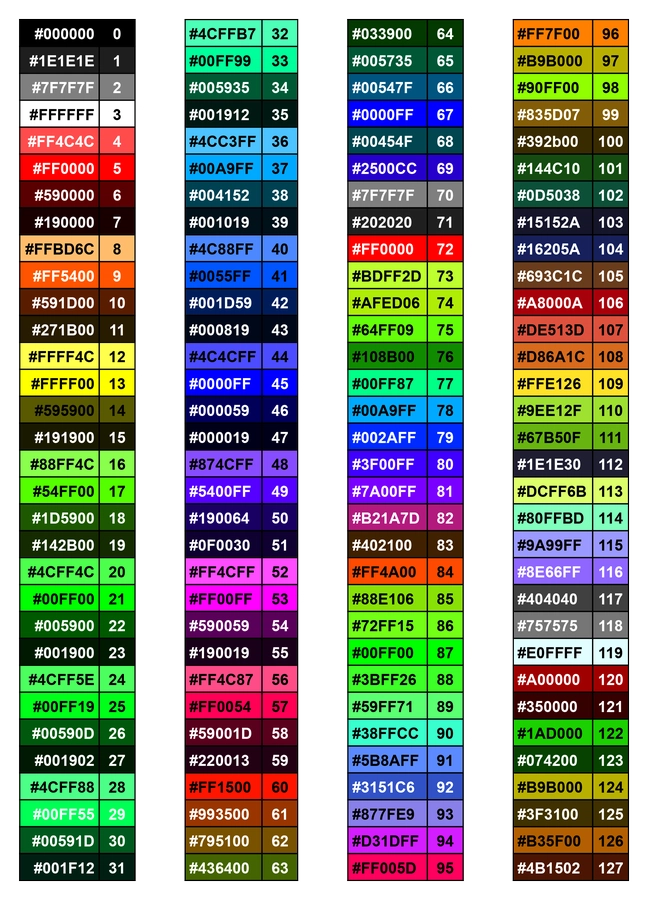
The hardware uses a predetermined palette of 128 RGB values assigned to specific velocities (Byte 3 in the message).
This palette is hardcoded and cannot be changed.
If we want to change Pad 1 to a solid orange, we send: 96 00 09
96= Solid lit at 100%00= Pad 109= Velocity 09 (Orange)
Velocity to RGB Color Reference:
- Black: 0
- White: 3
- Red: 5 or 72
- Green: 21 or 87
- Blue: 45 or 67
- Yellow: 13
- Pink: 53
- Cyan: 90
➡️ Access the RGB Mapping Google Sheet
Single LED Behavior & Color
The UI buttons utilize single-color LEDs and require a unique control message structure compared to the RGB matrix.
Example Message: To solidly light the Track Button 1 LED (which is physically restricted to red), send the following: 90 64 01
90= MIDI Channel 1 (Note: This will always be 90 for single LED commands. RGB blink and pulse values do not apply to these buttons).64= Note 100 (Button ID: Track Button 1)01= Velocity 1 (LED Behavior: ON)
Use the reference table below to construct your single LED MIDI messages:
| Byte Number | Hex Value | Decimal Value | Description |
| 1 | 0x90 | N/A | Channel 1, Note-On |
| 2 | 0x64 to 0x77 | 100 to 119 | Button ID (Reference the Button ID tables above) |
| 3 | 0x000x010x020x03 to 0x7F | 0 1 2 3 to 127 | Velocity 0 = LED OFF Velocity 1 = LED ON Velocity 2 = LED BLINK Velocity 3 to 127 = LED ON |
Protocol Examples
For quick reference, the shorthand notation 7 0 5 translates to Channel 7, Note 0, Velocity 5.
Here are common execution strings:
- Send Note-On
7 0 5to light the first pad in red (Normal Mode). - Send Note-On
7 63 5to light the last pad in red (Normal Mode). - Send Note-On
10 64 5to light the first pad in red (Drum Mode). - Send Note-On
10 127 5to light the last pad in red (Drum Mode). - Send Note-On
1 107 127to light the first Track Button. - Send Note-On
1 112 127to light the first Scene Launch Button.
Mode Switching via SysEx
Whenever you change the device mode, a corresponding System Exclusive (SysEx) message is sent.
You can send these specific messages to force the controller into a new mode remotely, without pressing any hardware buttons.
This is highly useful for initialization sequences or ecosystem syncing.
- Normal Mode:
F0 47 7F 4F 62 00 01 00 F7 - Note Mode:
F0 47 7F 4F 62 00 01 01 F7 - Drum Mode:
F0 47 7F 4F 62 00 01 02 F7
Bulk LED Message Formatting
RGB Matrix
To update the entire grid, pad values remain constant while the MIDI Channel and RGB color variables change.
- Format:
9X [Pad ID] XX 9X 00 XXthrough9X 3F XX
The Hex prefix 9X translates to a standard Note On message, where X determines the MIDI Channel (0 to F = Channels 1 to 16).
Example: 90 01 05 translates to Note On, Channel 1, Note 1, Velocity 5.
| 9X 01 XX | 9X 11 XX | 9X 21 XX | 9X 31 XX |
| 9X 02 XX | 9X 12 XX | 9X 22 XX | 9X 32 XX |
| 9X 03 XX | 9X 13 XX | 9X 23 XX | 9X 33 XX |
| 9X 04 XX | 9X 14 XX | 9X 24 XX | 9X 34 XX |
| 9X 05 XX | 9X 15 XX | 9X 25 XX | 9X 35 XX |
| 9X 06 XX | 9X 16 XX | 9X 26 XX | 9X 36 XX |
| 9X 07 XX | 9X 17 XX | 9X 27 XX | 9X 37 XX |
| 9X 08 XX | 9X 18 XX | 9X 28 XX | 9X 38 XX |
| 9X 09 XX | 9X 19 XX | 9X 29 XX | 9X 39 XX |
| 9X 0A XX | 9X 1A XX | 9X 2A XX | 9X 3A XX |
| 9X 0B XX | 9X 1B XX | 9X 2B XX | 9X 3B XX |
| 9X 0C XX | 9X 1C XX | 9X 2C XX | 9X 3C XX |
| 9X 0D XX | 9X 1D XX | 9X 2D XX | 9X 3D XX |
| 9X 0E XX | 9X 1E XX | 9X 2E XX | 9X 3E XX |
| 9X 0F XX | 9X 1F XX | 9X 2F XX | 9X 3F XX |
Single LED UI Buttons
Button values and the MIDI Channel are constant, while the LED behavior (velocity) is variable.
- Format:
90 [Button ID] XX 90 64 XXthrough90 77 XX
The Hex prefix 90 translates to a Note On message on Channel 1.
Example: 90 64 01 translates to Note On, Channel 1, Note 100, Velocity 1.
| 90 64 XX |
| 90 65 XX |
| 90 66 XX |
| 90 67 XX |
| 90 68 XX |
| 90 69 XX |
| 90 6A XX |
| 90 6B XX |
| 90 70 XX |
| 90 71 XX |
| 90 72 XX |
| 90 73 XX |
| 90 74 XX |
| 90 75 XX |
| 90 76 XX |
| 90 77 XX |
Advanced SysEx Operations
RGB LED Color Customization
Alternatively, RGB pad colors can be customized using SysEx commands to set one or several LEDs to a specific color profile.
The color is generated by sending three 8-bit values for Red, Blue, and Green.
Since standard MIDI only supports 7-bit messages, each component is expressed using MSB/LSB.
| Byte Number | Value | Description |
|---|---|---|
| 1 | 0xF0 | MIDI System exclusive message start |
| 2 | 0x47 | Manufacturers ID Byte |
| 3 | 0x7F | System Exclusive Device ID |
| 4 | 0x4F | Product model ID |
| 5 | 0x24 | Message type identifier |
| 6 | <total MSB> | Number of data bytes to follow (most significant) |
| 7 | <total LSB> | Number of data bytes to follow (least significant) |
| 8 | 0x00-0x3F | Start Pad |
| 9 | 0x00-0x3F | End Pad |
| 10 | 0x00-0x7F | Red Brightness MSB |
| 11 | 0x00-0x7F | Red Brightness LSB |
| 12 | 0x00-0x7F | Green Brightness MSB |
| 13 | 0x00-0x7F | Green Brightness LSB |
| 14 | 0x00-0x7F | Blue Brightness MSB |
| 15 | 0x00-0x7F | Blue Brightness LSB |
| … | … | Repeat bytes 8-15 for each additional pad color change |
| <bytes total> | 0xF7 | MIDI System exclusive message terminator |
Generic SysEx Inquiries & Introduction
Depending on the required software implementation, the APC mini mk2 will respond to the following MMC Device Enquiry and initialization messages.
| Byte Number | Value | Description |
|---|---|---|
| 1 | 0xF0 | MIDI System exclusive message start |
| 2 | 0x47 | Manufacturers ID Byte |
| 3 | 0x7F | System Exclusive Device ID |
| 4 | 00x4F | Product model ID |
| 5 | <Message ID> | Message type identifier |
| 6 | <DataLengthMSB> | Number of data bytes to follow (most significant) |
| 7 | <DataLengthLSB> | Number of data bytes to follow (least significant) |
| 8 | n data bytes | Data field – n bytes long |
| n+8 | 0xF7 | MIDI System exclusive message terminator |
Device Enquiry
The APC mini mk2 supports the standard MMC Device Enquiry message.
These System Exclusive messages are part of the MIDI Machine Control Standard and do not follow the general format for Inbound System Exclusive messages.
Inquiry Request:
| Byte Number | Value | Description |
|---|---|---|
| 1 | 0xF0 | MIDI System exclusive message start |
| 2 | 0x7E | Non-Realtime Message |
| 3 | 0x00 | Channel to inquire. (Set to 0 for this protocol.) |
| 4 | 0x06 | Inquiry Message |
| 5 | 0x01 | Inquiry Request |
| 6 | 0xF7 | MIDI System exclusive message terminator |
Inquiry Response:
The APC mini mk2 will respond to a Device Inquiry Request message with the following data:
| Byte Number | Value | Description |
|---|---|---|
| 1 | 0xF0 | MIDI System exclusive message start |
| 2 | 0x7E | Non-Realtime Message |
| 3 | <MIDI Channel> | Common MIDI channel setting |
| 4 | 0x06 | Inquiry Message |
| 5 | 0x02 | Inquiry Response |
| 6 | 0x47 | Manufacturers ID Byte |
| 7 | 00x4F | Product model ID |
| 8 | 0x00 | Number of data bytes to follow (most significant) |
| 9 | 0x19 | Number of data bytes to follow (least significant) |
| 10 | <Version1> | Software version major most significant |
| 11 | <Version2> | Software version major least significant |
| 12 | <Version3> | Software version minor most significant |
| 13 | <Version4> | Software version minor least significant |
| 14 | <DeviceID> | System Exclusive Device ID |
| 15 | <Serial1> | Serial Number first digit |
| 16 | <Serial2> | Serial Number second digit |
| 17 | <Serial3> | Serial Number third digit |
| 18 | <Serial4> | Serial Number fourth digit |
| 19 | <Manufacturing1> | Manufacturing Data byte 1 |
| 20 | <Manufacturing2> | Manufacturing Data byte 2 |
| 21 | <Manufacturing3> | Manufacturing Data byte 3 |
| 22 | <Manufacturing4> | Manufacturing Data byte 4 |
| 23 | <Manufacturing5> | Manufacturing Data byte 5 |
| 24 | <Manufacturing6> | Manufacturing Data byte 6 |
| 25 | <Manufacturing7> | Manufacturing Data byte 7 |
| 26 | <Manufacturing8> | Manufacturing Data byte 8 |
| 27 | <Manufacturing9> | Manufacturing Data byte 9 |
| 28 | <Manufacturing10> | Manufacturing Data byte 10 |
| 29 | <Manufacturing11> | Manufacturing Data byte 11 |
| 30 | <Manufacturing12> | Manufacturing Data byte 12 |
| 31 | <Manufacturing13> | Manufacturing Data byte 13 |
| 32 | <Manufacturing14> | Manufacturing Data byte 14 |
| 33 | <Manufacturing15> | Manufacturing Data byte 15 |
| 34 | <Manufacturing16> | Manufacturing Data byte 16 |
| 35 | 0xF7 | MIDI System exclusive message terminator |
Introduction Message
This message is sent before any other device-specific message (other than Device Enquiry).
It instructs the APC mini mk2 to perform necessary initialization and informs the firmware of the application version number so changes in the host application can be catered for.
| Byte Number | Value | Description |
|---|---|---|
| 1 | 0xF0 | MIDI System exclusive message start |
| 2 | 0x47 | Manufacturers ID Byte |
| 3 | 00x7F | System Exclusive Device ID |
| 4 | 0x4F | Product model ID |
| 5 | 0x60 | Message type identifier |
| 6 | 0x00 | Number of data bytes to follow (most significant) |
| 7 | 0x04 | Number of data bytes to follow (least significant) |
| 8 | 0x00 | Application/Configuration identifier |
| 9 | <Version High> | application Software version major |
| 10 | <Version Low> | application Software version minor |
| 11 | <Bugfix Level> | Application Software bug-fix level |
| 12 | 0xF7 | MIDI System exclusive message terminator |
Response from APC mini mk2 Introduction message:
| Byte Number | Value | Description |
|---|---|---|
| 1 | 0xF0 | MIDI System exclusive message start |
| 2 | 0x47 | Manufacturers ID Byte |
| 3 | 0x7F | System Exclusive Device ID |
| 4 | 0x4F | Product model ID |
| 5 | 0x61 | Message type identifier |
| 6 | 0x00 | Number of data bytes to follow (most significant) |
| 7 | 0x04 | Number of data bytes to follow (least significant) |
| 8 | <Fader #1 Value> | Sends the current value of Fader #1. |
| 9 | <Fader #2 Value> | Sends the current value of Fader #2. |
| 10 | <Fader #3 Value> | Sends the current value of Fader #3. |
| 11 | <Fader #4 Value> | Sends the current value of Fader #4. |
| 12 | <Fader #5 Value> | Sends the current value of Fader #5. |
| 13 | <Fader #6 Value> | Sends the current value of Fader #6. |
| 14 | <Fader #7 Value> | Sends the current value of Fader #7. |
| 15 | <Fader #8 Value> | Sends the current value of Fader #8. |
| 16 | <Fader #9 Value> | Sends the current value of Fader #9. |
| 17 | 0xF7 | MIDI System exclusive message terminator |
Hardware Control Mapping
Use the following reference data to determine the MIDI values corresponding to physical hardware controls and faders.
The following chart shows the MIDI Note # associated with each button.
This number will be used for the Inbound Note-On/Off values when the buttons are pressed, and Outbound Note-On messages to control the button’s LEDs, if applicable.
| Button Name | Note # | Note # | Channel | LED | Port # | Notes |
| Track Button 1 | 0x64 | 100 | 0 | Red | 0 | |
| Track Button 2 | 0x65 | 101 | 0 | Red | 0 | |
| Track Button 3 | 0x66 | 102 | 0 | Red | 0 | |
| Track Button 4 | 0x67 | 103 | 0 | Red | 0 | |
| Track Button 5 | 0x68 | 104 | 0 | Red | 0 | |
| Track Button 6 | 0x69 | 105 | 0 | Red | 0 | |
| Track Button 7 | 0x6A | 106 | 0 | Red | 0 | |
| Track Button 8 | 0x6B | 107 | 0 | Red | 0 | |
| Scene Launch 1 | 0x70 | 112 | 0 | Green | 0 | |
| Scene Launch 2 | 0x71 | 113 | 0 | Green | 0 | |
| Scene Launch 3 | 0x72 | 114 | 0 | Green | 0 | |
| Scene Launch 4 | 0x73 | 115 | 0 | Green | 0 | |
| Scene Launch 5 | 0x74 | 116 | 0 | Green | 0 | |
| Scene Launch 6 | 0x75 | 117 | 0 | Green | 0 | |
| Scene Launch 7 | 0x76 | 118 | 0 | Green | 0 | |
| Scene Launch 8 | 0x77 | 119 | 0 | Green | 0 | |
| Shift | 0x7A | 122 | 0 | None | 0 | |
| Clip Launch Button 0-63 | 0x00 – 0x3F | 0x00 – 0x3F | See Notes | RGB | See Notes | *Port 0, MIDI CH 00-0F used when in Session View. *Port 0, MIDI CH 09 used when in Drum Mode. *Port 1, MIDI CH 00 used in Note Mode. |
Channel Faders & Master Fader
The eight Channel Faders (1 to 8) and the single Master Fader (9) send absolute position data via MIDI CC# on USB Port 0.
| Control Name | CC# | CC# | Channel | Port | Notes |
| Fader 1 | 0x30 | 48 | 0 | 0 | Value is the absolute position of the Fader. |
| Fader 2 | 0x31 | 49 | 0 | 0 | Value is the absolute position of the Fader. |
| Fader 3 | 0x32 | 50 | 0 | 0 | Value is the absolute position of the Fader. |
| Fader 4 | 0x33 | 51 | 0 | 0 | Value is the absolute position of the Fader. |
| Fader 5 | 0x34 | 52 | 0 | 0 | Value is the absolute position of the Fader. |
| Fader 6 | 0x35 | 53 | 0 | 0 | Value is the absolute position of the Fader. |
| Fader 7 | 0x36 | 54 | 0 | 0 | Value is the absolute position of the Fader. |
| Fader 8 | 0x37 | 55 | 0 | 0 | Value is the absolute position of the Fader. |
| Fader 9 | 0x38 | 56 | 0 | 0 | Value is the absolute position of the Fader. |

Max Mugen Lighting
Lighting Designer | Visual Artist | Automation Developer
I engineer lighting architectures, interactive control systems, and automation workflows for live performance and high-end studio pipelines. Available for custom system design and technical programming.
Work With Me
Explore My Work
Stay Connected


